
MEPCO Bill Checker
Understanding Your MEPCO Electricity Bill: A Complete Guide
For millions of residents across Multan, Bahawalpur, Dera Ghazi Khan, and other cities in South Punjab, the monthly MEPCO electricity bill is more than just a piece of paper. It represents household budgeting, energy consumption patterns, and sometimes unexpected financial pressure. Understanding your bill, checking it online, and knowing your payment options can save you both money and stress.
What Exactly is a MEPCO Bill?
MEPCO, short for Multan Electric Power Company, issues a monthly electricity bill to every consumer in its service area. This document does more than just demand payment. It tells you exactly how many units of electricity you consumed during the billing cycle, the various government taxes applied to your usage, the due date for payment, and any late payment surcharges if you miss that date. The bill also provides a twelve-month consumption history, allowing you to track your electricity usage patterns across seasons.
For many households, the paper bill arrives late or gets misplaced. Fortunately, you can now check your MEPCO bill online within seconds using nothing more than your reference number or customer ID. This free service works twenty-four hours a day, seven days a week, and requires no account creation or sign-up process.
What Information Do You Need to Check Your Bill Online?
To access your MEPCO electricity bill online, you only need one piece of information: your fourteen-digit reference number. You can find this number printed on the top left corner of any previous bill, just above your name. It typically appears in a format like “12 34567 8910112 U/R”. If you do not have any old bill, you can use your ten-digit customer ID instead. The customer ID is also printed on your bill, usually near the reference number.
It is important to understand that you cannot check your MEPCO bill using your CNIC number or your name. These personal details are not accepted by the billing system. You must have either your reference number or your customer ID to proceed.
What Happens If You Have Lost Your Reference Number?
Losing your reference number is a common problem, especially for new electricity connections. If you do not have any previous bill, do not worry. You can still find your reference number by visiting the official MEPCO website and using their CNIC registration service. Simply go to the MEPCO official portal, choose the search by CNIC option, and enter your Computerized National Identity Card number correctly. The system will then display your reference number. Once you have it, you can return to the bill checking page and proceed as usual.
A word of caution: never share your CNIC number with any untrusted third-party website. Always use the official MEPCO portal for this purpose to protect your personal information from misuse.
How to Check Your MEPCO Bill Online Step by Step
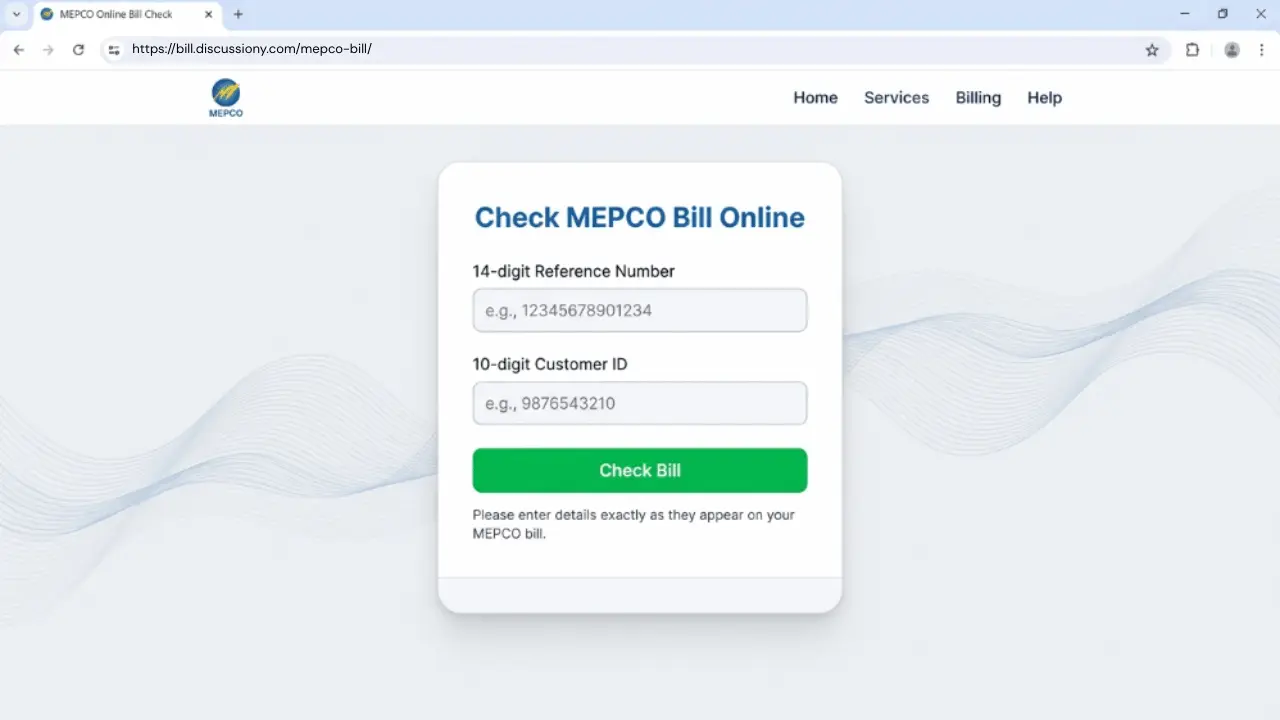
The process of checking your MEPCO bill online is designed to be simple and quick. Follow these straightforward steps to access your duplicate bill within moments.
First, visit the bill checking page on your preferred device. This could be your smartphone, tablet, laptop, or desktop computer. The website works smoothly on all screen sizes.
Second, locate the input field that asks for your reference number. Enter your complete fourteen-digit reference number carefully. Double-check that you have not missed any digit or added extra spaces. Even a small mistake will prevent the system from finding your bill.
Third, click on the Check Bill button. The system will then connect to the official PITC billing database and retrieve your latest electricity record. Within a few seconds, you will see a message confirming that your bill is ready.
Fourth, click on the Open My Bill button. A new window will open displaying your complete MEPCO electricity bill exactly as it would appear on paper. You can now review all the details including your total consumption, applicable charges, taxes, due date, and the final payable amount.
Finally, you can download, print, or take a screenshot of your bill for your records. If you need a physical copy, simply click the print button and choose your printer. If you prefer a digital copy, select the Save as PDF option from the destination menu and save the file to your device.
Understanding the Charges on Your MEPCO Bill
Many consumers feel confused when they look at their electricity bill and see multiple charges besides the basic cost of electricity. Understanding these charges helps you know exactly where your money is going and why your bill might be higher or lower than the previous month.
The most common charge on your bill is the Meter Rent. This is a fixed monthly fee for the use of the meter that measures your electricity consumption. Every consumer pays this charge regardless of how much electricity they use.
The Fuel Price Adjustment, often abbreviated as FPA, is another common charge. This adjustment reflects changes in the cost of fuel used to generate electricity. When global fuel prices rise, your FPA increases. When fuel prices drop, your FPA decreases. This charge is added to your bill to help power companies manage fluctuating fuel costs.
General Sales Tax, or GST, is the government tax applied to your electricity consumption. The current GST rate is approximately seventeen percent. This tax applies to almost all consumer categories and significantly contributes to your final bill amount.
Electricity Duty, or ED, is a per-unit tax charged by the government. This duty typically ranges from forty to fifty paisa per unit and applies when your monthly consumption exceeds one hundred units.
Other charges you might see include the Tariff Rationalization Surcharge, which adjusts for differences between government and regulatory tariffs, and the Financing Cost Surcharge, which helps manage loans and financial obligations within the power sector. The Quarterly Tariff Adjustment appears once every three months and accounts for variations in fuel prices, exchange rates, and transmission expenses.
How to Pay Your MEPCO Bill Online
Once you have checked your bill and know the amount due, paying it online is both convenient and secure. Multiple payment options are available to suit your preference and convenience.
Mobile banking apps offer the fastest way to pay your bill. Simply log into your bank’s mobile application, navigate to the bill payment section, select MEPCO as your electricity company, enter your fourteen-digit reference number, and confirm the payment. Most banks process the payment instantly and send you a confirmation message.
JazzCash and EasyPaisa wallets also allow you to pay your MEPCO bill with just a few taps. Open your wallet app, select the bill payment option, choose electricity, select MEPCO, enter your reference number, and confirm the payment using your wallet password. This method is particularly popular among users who prefer mobile wallets over traditional banking.
For those who prefer traditional methods, you can still pay your bill by visiting any bank branch, post office, or NADRA e-Sahulat center. Keep your paper bill or duplicate copy with you and ask the cashier to process your payment. Always pay before the due date to avoid late payment charges.
MEPCO has also introduced an exciting initiative for users who pay their bills using Raast QR. By scanning the QR code on your bill and completing the payment through your bank or wallet app, you automatically enter a lucky draw. Prizes include forty-two inch LED televisions, smartphones, and wireless earbuds. This makes paying your bill not just a necessity but also an opportunity to win valuable rewards.
What Are MEPCO Peak Hours and Why Do They Matter?
MEPCO charges higher electricity rates during specific hours of the day, known as peak hours. These hours vary depending on the season. During peak hours, electricity demand is highest, and the utility charges more per unit to encourage consumers to reduce their usage.
From December to February, peak hours are from five in the evening to nine at night. From March to May, the peak window shifts to six in the evening to ten at night. During the hot summer months of June to August, peak hours extend from seven in the evening to eleven at night. Finally, from September to November, peak hours return to six in the evening to ten at night.
To reduce your electricity bill, avoid using heavy appliances during these peak hours. Air conditioners, heaters, freezers, irons, washing machines, and water motors all consume significant electricity. Running them outside peak hours can noticeably lower your monthly bill. Small adjustments in your daily routine can lead to meaningful savings over time.
What Should You Do If Your MEPCO Bill Seems Too High?
Sometimes, you might receive a bill that seems unusually high compared to your normal consumption. In most cases, billing issues occur due to incorrect meter readings. The meter reader might have misread your meter digits, or the reading might have been estimated rather than actually taken.
If you suspect an error, start by checking the meter reading printed on your bill. Then, go to your physical electricity meter installed at your home and compare the reading. If the numbers do not match, take a clear photograph of your meter showing the current reading. Visit your nearest MEPCO office and submit a written complaint along with the photograph. Keep the complaint number safe for future reference. You can also call the MEPCO helpline at 118 for guidance on how to register a complaint and get your bill corrected.
How to Reduce Your Monthly MEPCO Electricity Bill
Reducing your electricity bill does not require major lifestyle changes. Simple adjustments in your daily habits can lead to noticeable savings over time.
Set your air conditioner temperature to twenty-six degrees Celsius. This temperature provides comfortable cooling while consuming significantly less electricity than lower settings. Use energy-saving LED bulbs instead of traditional incandescent or CFL bulbs. LED bulbs use up to seventy-five percent less energy and last much longer.
Switch off lights, fans, and other appliances when you leave a room. Unplug devices completely instead of leaving them on standby mode. Many electronics continue to draw small amounts of power even when turned off but still plugged in. This phantom power consumption adds up over time.
Iron your clothes once or twice a week instead of daily. Use a fan at night instead of running the air conditioner whenever possible. During peak hours, shift high-energy tasks like laundry and ironing to off-peak times. If your budget allows, consider installing solar panels for your water geyser or water pump. These small changes, when practiced consistently, can significantly reduce your monthly electricity expenses.
Frequently Asked Questions About MEPCO Bills
Many consumers have similar questions about their MEPCO electricity bills. Here are answers to the most common queries.
Can I check my bill without a reference number?
Yes, you can use your ten-digit customer ID instead. The customer ID works exactly like the reference number and gives you access to the same billing information.
Is this an official MEPCO website?
No, this website is an independent helper tool designed to make bill checking easier for consumers. However, the bill data comes directly from MEPCO and PITC official records, ensuring accuracy and reliability.
Can I check my old bills?
Yes, when your current bill appears on screen, you can also view your billing history for the last twelve months. This helps you track your consumption patterns and compare bills across different seasons.
Can I check the bill using my CNIC or name?
No, the system only accepts the fourteen-digit reference number or the ten-digit customer ID. CNIC and name searches are not supported for bill retrieval.
What if my bill does not show after entering my reference number?
First, verify that you have entered the correct reference number without any missing digits or extra spaces. If the number is correct, try again after a few minutes. Sometimes the billing system experiences temporary delays. If the problem persists, your bill might not have been generated yet for the current month.
How do I confirm whether my electricity bill has been paid?
The easiest way is to check your bill online after forty-eight hours of making the payment. Look for the red paid stamp printed below the meter picture on your bill. You can also check your bank statement, wallet notifications, or contact the MEPCO helpline for confirmation.
Final Words of Advice
Checking your MEPCO bill online regularly is a smart habit that offers multiple benefits. You avoid late fees by knowing your due date in advance. You control your electricity usage by tracking your consumption month to month. You plan your monthly expenses more effectively when you know exactly how much to expect on your bill. And you detect billing mistakes early, allowing you to file complaints before the payment deadline.
Remember that this online tool is free, simple, and safe to use. It automatically fetches data from the official PITC source, and no billing data or input data is stored on our servers. For any legal or serious billing issues, always contact MEPCO directly. Use this guide as a reference, but rely on official channels for final decisions regarding your electricity account.
By staying informed and proactive about your MEPCO electricity bill, you can manage your household budget more effectively, avoid unnecessary late fees, and maintain better control over your energy consumption. Start checking your bill online today and experience the convenience of having your electricity information at your fingertips, available anytime you need it.